The Power of Data through Xeppo and Power BI
In March 2021, Madison launched Xeppo and Power BI which allows your practice to establish a single view of clients across your Financial Planning systems and CommPay, which provides data and insights to help you understand your business and in turn grow your business.
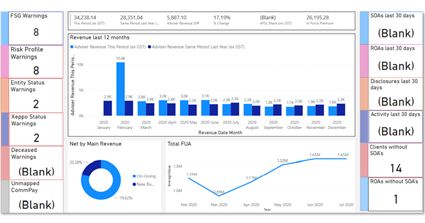
Power BI has a dashboard that allows you to create key alerts and filter information to help identify growth opportunities by segment as well as manage key compliance activities. An example of the Power BI Dashboard below shows:
- Revenue for the last 12 months which flows from Commpay.
- Clients that don’t have a SOA which means that there is not a file note that depicts a sub – type being SOA.
- FSG Warning shows clients that have a overdue FDS date.
Our practices currently utilising Power BI use the dashboard to help manage their compliance requirements and helps identify at a glance key actions that need to be addressed as a priority. Creating this level of visibility for your practice can help manage risk and give you peace of mind. I have attached the video link that will help give you an understanding of the power of data in Power BI.
Madison News & Updates | Group | Workplace
What’s Next?
Your Practice Manager or myself will be in touch over the coming months to discuss how Power BI can give you visibility of your business data and what is possible by way of dashboards, reporting and alerts.
In the meantime, if you would like to know how Power BI can be beneficial to your practice, please don’t hesitate to reach out to Megan.
In this Edition
The Power of Data through Xeppo and Power BI
In March 2021, Madison launched Xeppo and Power BI which allows your practice to establish a single view of clients across your Financial Planning systems and CommPay, which provides data and insights to help you understand your business and in turn grow your business.
Power BI has a dashboard that allows you to create key alerts and filter information to help identify growth opportunities by segment as well as manage key compliance activities. An example of the Power BI Dashboard below shows:
- Revenue for the last 12 months which flows from Commpay.
- Clients that don’t have a SOA which means that there is not a file note that depicts a sub – type being SOA.
- FSG Warning shows clients that have a overdue FDS date.
Our practices currently utilising Power BI use the dashboard to help manage their compliance requirements and helps identify at a glance key actions that need to be addressed as a priority. Creating this level of visibility for your practice can help manage risk and give you peace of mind. I have attached the video link that will help give you an understanding of the power of data in Power BI.
Madison News & Updates | Group | Workplace
What’s Next?
Your Practice Manager or myself will be in touch over the coming months to discuss how Power BI can give you visibility of your business data and what is possible by way of dashboards, reporting and alerts.
In the meantime, if you would like to know how Power BI can be beneficial to your practice, please don’t hesitate to reach out to Megan.
In this Edition