
The Power of Minimum Data with Power BI
In our last newsletter we reintroduced to you the new business dashboard powered through Xeppo and Power BI reporting and provided some of the features, benefits, and capabilities of this new dashboard.
The Power of Data
Good client records to support good governance and great advice. So how can Power BI help identify issues in your data so that they can be relied upon?
Power BI reporting provides the ability to identify data discrepancies across your source systems and manage the updating of key client data back to those systems.
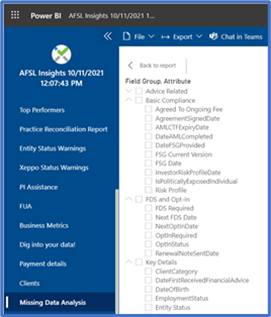
Under the Missing Data Analysis in Power BI you have the ability to filter all the minimum data fields that need to be met. From here you can match this data and update your relevant source systems.
So how does this help my business?
An essential for any integrated business that values the accuracy and consistency of client data within their practice. In September 2020 at Madison’s Good Governance Forum, the 912G Recording Keeping and Madison Advice Policy for minimum data and documentation to be record on your digital client files. Policies – Madison Financial Group Pty Limited (madisonfg.com.au)
Power BI allows you to check these minimum data requirements by using the left hand menu and clicking on Missing Data Analysis and selecting from the Field Group for example DateofBirth and display which clients do not have a Date of Birth in your source system.
Leveraging Data
To help leverage your client data Power BI reporting here are a few tips for you to review to ensure a smoother transition when utilising Power BI:
- Archiving clients that are not active
- Making sure clients are grouped correctly eg. individuals and entities attached to one group
- Datafeeds are connected in IPS to client groups and portfolios for non datafeed assets, insurance policies are all listed against client groups
- Datafeed exception reporting has been cleaned out/actioned
- All key dates are recorded
For further information please don’t hesitate to reach out to myself.
REMINDER – Power BI Reporting
In order for you to utilise Power BI Reporting in Xeppo you will need a Microsoft pro to access Power BI reporting.
If you currently have a Microsoft licence in your practice you will need to upgrade this licence to Microsoft Power BI Pro licence and you can do that by clicking on this link https://powerbi.microsoft.com/en-us/power-bi-pro/. The cost for this licence is $10 USD per month.
In this Edition
| · A message from Jaime | · The View from Clime | · Making the most of Canva |
The Power of Minimum Data with Power BI
In our last newsletter we reintroduced to you the new business dashboard powered through Xeppo and Power BI reporting and provided some of the features, benefits, and capabilities of this new dashboard.
The Power of Data
Good client records to support good governance and great advice. So how can Power BI help identify issues in your data so that they can be relied upon?
Power BI reporting provides the ability to identify data discrepancies across your source systems and manage the updating of key client data back to those systems.
Under the Missing Data Analysis in Power BI you have the ability to filter all the minimum data fields that need to be met. From here you can match this data and update your relevant source systems.
So how does this help my business?
An essential for any integrated business that values the accuracy and consistency of client data within their practice. In September 2020 at Madison’s Good Governance Forum, the 912G Recording Keeping and Madison Advice Policy for minimum data and documentation to be record on your digital client files. Policies – Madison Financial Group Pty Limited (madisonfg.com.au)
Power BI allows you to check these minimum data requirements by using the left hand menu and clicking on Missing Data Analysis and selecting from the Field Group for example DateofBirth and display which clients do not have a Date of Birth in your source system.
Leveraging Data
To help leverage your client data Power BI reporting here are a few tips for you to review to ensure a smoother transition when utilising Power BI:
- Archiving clients that are not active
- Making sure clients are grouped correctly eg. individuals and entities attached to one group
- Datafeeds are connected in IPS to client groups and portfolios for non datafeed assets, insurance policies are all listed against client groups
- Datafeed exception reporting has been cleaned out/actioned
- All key dates are recorded
For further information please don’t hesitate to reach out to myself.
REMINDER – Power BI Reporting
In order for you to utilise Power BI Reporting in Xeppo you will need a Microsoft pro to access Power BI reporting.
If you currently have a Microsoft licence in your practice you will need to upgrade this licence to Microsoft Power BI Pro licence and you can do that by clicking on this link https://powerbi.microsoft.com/en-us/power-bi-pro/. The cost for this licence is $10 USD per month.
In this Edition
| · A message from Jaime | · The View from Clime | · Making the most of Canva |